Anyone managing Meta Ads knows how quickly the platform evolves — and sometimes, these changes arrive without notice.
One of the most subtle yet impactful updates involves the way local targeting works.
Until recently, advertisers could decide whether to reach only people living in a certain city, those who had recently been there, or those traveling nearby.
Today, however, that level of control is gone. Behind what looks like a simple improvement hides a real risk: the Facebook Ads geographic expansion option being automatically activated.
At first glance, this feature sounds useful. Meta presents it as a way to “reach more people interested” in your selected area. In practice, it often hurts precision, especially for local businesses. Even worse, it can reactivate itself when you duplicate an ad set or after the learning phase — without any clear warning.
What Meta Says About Location Targeting
According to Meta’s Business Help Center, ads can be shown to people who live in or were recently in a specific area.
This means the algorithm no longer distinguishes clearly between residents and visitors.
On top of that, Meta now offers — and often pre-selects — a feature allowing ads to reach people interested in a location, even if they are not physically there.
It’s an extension of behavioral targeting applied to geography. But being interested in a place is not the same as being there or wanting to buy locally.
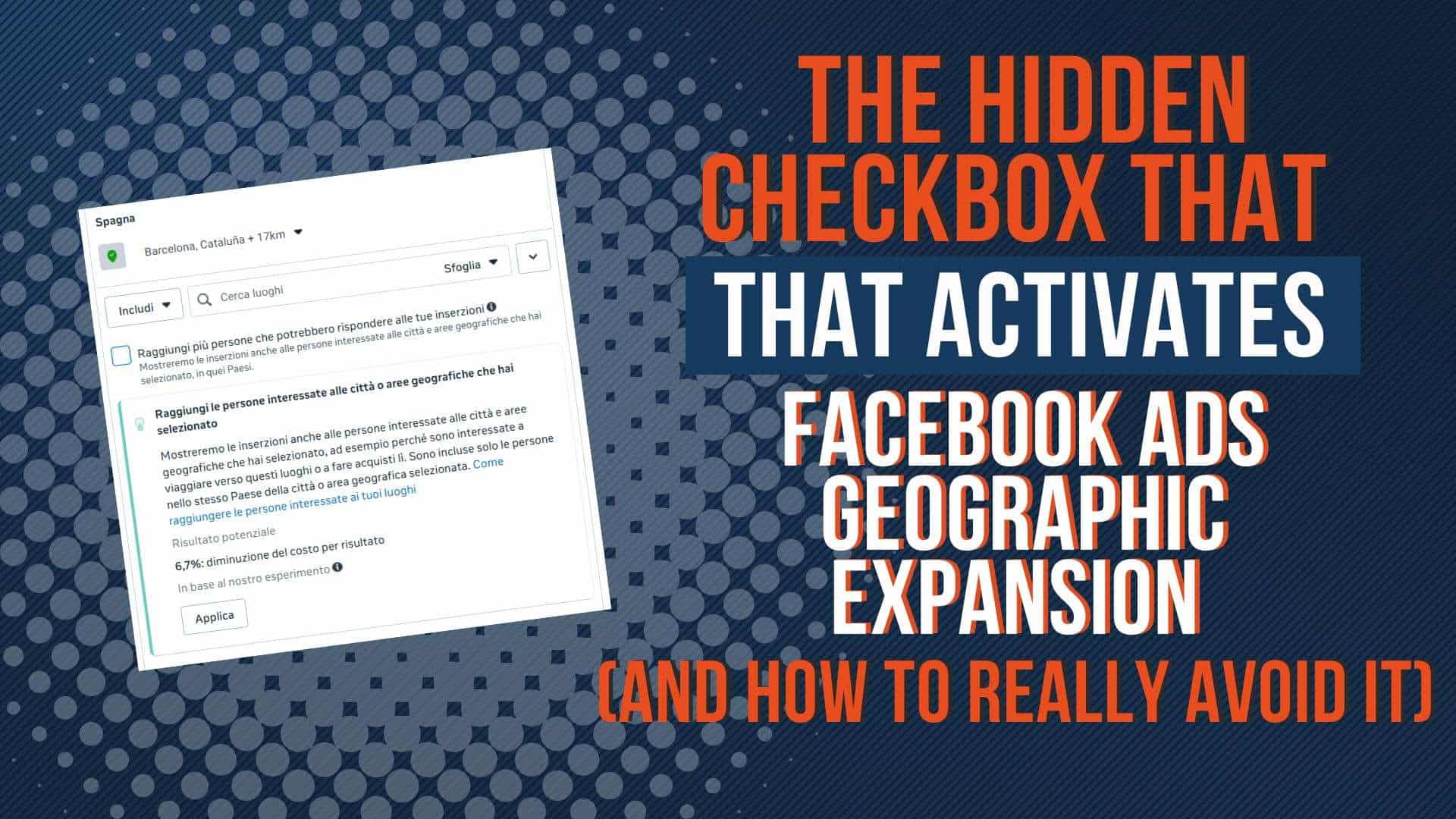
That’s where Facebook Ads geographic expansion comes in — a tiny checkbox, easily overlooked, that can completely change your audience composition and distort your campaign results.
When Facebook Ads Geographic Expansion Turns Itself Back On
Many advertisers report that even after disabling this option, it mysteriously turns itself back on.
This tends to happen in two key moments.
First, when duplicating an ad set. Meta often copies hidden parameters along with the ad structure. The Facebook Ads geographic expansion checkbox may reactivate automatically, even if it was off in the original version.
Second, it may reappear after the learning phase. Some advertisers have noticed that Meta resets certain “recommended” options in the background to improve delivery, including geographic expansion.
While Meta hasn’t officially labeled this as a bug, professionals across Reddit and other marketing communities describe it as a recurring, costly behavior that often goes unnoticed until performance drops.
Facebook Ads Geographic Expansion: Why This Is a Real Issue for Local Businesses
This isn’t just a question of accuracy; it directly impacts campaign quality and budget efficiency.
For local campaigns — restaurants, clinics, events, or stores — relevance depends on reaching people truly present in the area.
When Facebook Ads geographic expansion is active, part of your budget goes to users outside your target zone: people who looked up your city online, passed through once, or live abroad but show digital interest.
As Jon Loomer explains,
“The Location Expansion feature is turned on by default for some advertisers, meaning ads may reach people outside your selected areas — even if you never enabled it.”
Independent analyses, such as one from Leadenforce, confirm this: geographic expansion can distort ROAS by producing cheaper but less relevant clicks, and conversions that don’t actually align with local intent.
How to Detect and Manage the Hidden Checkbox
Many advertisers only realize something’s off when clicks start coming from unexpected regions.
That’s why building a consistent review habit is essential.
Start at the Ad Set level, then open the Location section.
If you see the option “Reach people interested in the cities or areas you selected”, make sure it’s disabled.
After the learning phase, check again. Even if you previously unchecked it, the option may reactivate automatically.
Finally, don’t rely solely on top-level results: use the Breakdown by region feature to confirm whether impressions and clicks align with your chosen area.
Facebook Ads Geographic Expansion: Practical Strategies to Prevent It
Once you’re aware of the issue, consistency becomes your best safeguard.
Here’s how to minimize the impact of Facebook Ads geographic expansion on your campaigns.
Avoid mass-duplicating ad sets whenever possible. Create new ones from clean templates to prevent carrying hidden parameters.
Schedule a post-learning review roughly 7–10 days after launch — this helps confirm that no automatic reactivation occurred.
Keep an eye on click origins: if you notice a significant portion coming from outside your intended region, the expansion option is likely the culprit.
At the same time, use strongly localized creative assets.
Headlines like “Only in Dublin” or “Available in Milan” help the algorithm interpret geographic intent better while deterring off-area users from clicking.
If you manage large client accounts, you can even contact Meta Support to request a manual review or permanent disabling of the automatic expansion feature. Some agencies have successfully done this at the account level.
Why This Matters More Than Ever
Meta’s platform has shifted from explicit targeting to predictive distribution.
The algorithm now favors reach and average performance over human-defined precision.
That can work for national or global campaigns, but it’s risky for anyone relying on local audiences.
Manual control is still essential — and checking for Facebook Ads geographic expansion is one of those small but high-impact actions that can protect both your data integrity and your budget.
In the end, effective advertising isn’t about reaching more people.
It’s about reaching the right people. And when your business depends on a local market, accuracy is not a luxury — it’s the foundation of every successful campaign.